Sunday, September 2, 2018

Add Website Icon Image For Wodpress

Open the Site Identity panel by clicking it from the initial listing panel. Anytime you want to change your favicon from the main WordPress dashboard just go to Appearance then select Customise as shown below.


Font Awesome Makes It Easy To Add Vector Icons And Social Logos To Your Website And Version 5 Is Redesigned And Built From T Icon Social Media Icons Wordpress

Simply go to Appearance Customize and click on the Site Identity tab.

Add website icon image for wodpress. Click the Customize link under the Appearance menu. Prepare the image file. If youre ok with it click the Publish button at the top.

To begin go to your WordPress dashboard and click on Appearance Customize. The site identity section in customizer allows you to change the site title description and control whether or not you want to display them in the header. Here I have shown you to add an image icon only for one menu item.

For example a beautiful image icon next to your contact page can make it standout among other links in your menu. Follow the steps below to use Site Icon to set up a favicon for your site. However it is highly recommended that you use the Site Icon feature a feature that is built-in to WordPress instead.

Since WordPress 43 you can add a favicon or site icon from WordPress admin area. Return sizes add_filter site_icon_image_sizes add_my_site_icon_sizes. Install and activate Frontend Dashicons plugin.

Under Site Icon click the Select image button. With a few simple lines you can tell your theme to look for the image and show it in the navigation menu. WordPress menu icons can instantly leave a great impression to your audience.

Open the Customizer in WordPress. To add icons on image gallery thumbnails in WordPress youll need to follow these 4 steps. Just keep in mind.

Under Site Icon you can add change or remove your favicon. You can click Customize along the top bar if youre viewing pages on your site or Appearance Customize in the left-side menu if youre in your WordPress admin area. Adding Menu Icons with CSS Another method to add images to the menu bar in WordPress is through CSS coding.

How to Add a Background Image to Your Entire WordPress Site If your theme offers the capability to add a custom background image and many do it makes it much easier for you. Wordpress How to add icon image to website title bar of website Wordpress. Without using them adding new sizes is useless.

Click on Select Image. These links work for most websites however you can make your navigation menu look more interactive by adding image icons. Image icons can also be used to make your menu more noticeable.

Install and activate Envira Gallery plugin. Go to your media library click on the icon image you want to display copy the address you see in front of URL. Click Select Image located under the Site Icon.

Function add_my_site_icon_sizes sizes sizes 64. Next click on site identity just like you did to add your original favicon and select or upload a new image. Here you will see displayed Site Title and Site Icon.

Create an image gallery on your WordPress site. The first thing you need to do is upload all the icon images in your media section. Select all the icon images and upload them.

Your WordPress Media Library will now appear on your screen. It must be square having a height and width of at least 512 px Navigate to Administration Screen Appearance Customize. WordPress recommends it be at least 250px by 250px wide because it also uses it as your iOS button logo.

Adding this tiny detail really gives your website a professional appearance in the browser. Edit CSS file of your theme and add the code. From the Menu area click the Screen Options tab in the top right.

The little icon that shows up in each web pages browser tab is called a favicon. If it hasnt been used before on your site youll click the Select Image button. Since 2003 WordPress is behind some of the best and outstanding websites.

Press the Upload Files tab in the top-left corner and drag-and-drop your favicon image into the popup. Youve now successfully added a site icon for your WordPress website. You can specify an image to be your logo.

WordPress will show how it will look like. Upload your site icon and press the Select button. Open the Site Icon section.

Display the image gallery on the pagepost. Once the image loads press the Select button in the bottom-right corner. Who doesnt like a visually attractive website.

Select the Upload Files tab and then either drop your favicon image into the. Upload your favicon Now that you have your image return to the Site Identity section in the Customizer and click the Select site icon button. WordPress has won the hearts of developers businesses and also leading news agenciesThat is why news agencies like Reuters BBC and other big brands have been using WordPress.

Go to Admin Dashboard and move to Media option on the left menu and click on Add New.

Saturday, September 1, 2018

Cross Image Icon Png

Large collections of hd transparent Cross PNG images for free download. Personal and Commercial use.


Vector Cross Icon Cross Icons Close No Icon Png And Vector With Transparent Background For Free Download Instagram Logo Location Icon Icon

Download over 18442 icons of cross in SVG PSD PNG EPS format or as webfonts.

Cross image icon png. Download icons in all formats or edit them for your designs. You can use this images on your website with proper attribution. You can download PNG images with high-quality and transparent cross in different size measurements.

Christian Cross icon PNG and SVG Free Download We are creating and uploading new icons every day continue to support us. Also be sure to check out new icons and popular icons. This is cross icon png.

Optimized SVG file Minified PNG file PNG Size. Cancel Delete Cross Check Box - Free Image. There is no psd format for Christian cross PNG Cross Clipart HD Images in our system.

Cross png images of 29. Download as SVG vector Transparent PNG EPS or PSD. To created add 32 pieces transparent CROSS images of your project files with the background cleaned.

When designing a new logo you can be inspired by the visual logos found here. Download free cross png images. Skull and crossbones png.

Use this Cross or plus icon SVG for crafts or your graphic designs. PlusPNG Raphael Cross Icon Style. Cross PNG Images Cross Section Maltese Cross Cross Church Christian Cross Cross Fleury Cyclo Cross Celtic Cross Free PNG.

This Free Icons Png Design Of Prismatic Geometric Cross - Geometric Cross. Get free Cross icons in iOS Material Windows and other design styles for web mobile and graphic design projects. Cross Png You can download 38 free cross png images.

Green Pharmacy Cross W Bowl Of Hygieia - Pharmacy Green Cross. We always upload Highr Definition PNG Pictures. 512px x 512px Category.

Christian Cross Png Image With Transparent Background - Cross With Transparent Background. Download 400 cross png images with transparent background. You can start downloading png cross pictures which will make your designs different without paying any fee.

Download now Image Free Icons - Pack Monochrome Available sources SVG EPS PSD PNG files. Here you will get all types of PNG images with transparent background. These free images are pixel perfect to fit your design and available in both PNG and vector.

Coptic Cross Tattoo Designs Png Download - Coptic Cross. Simple Black Free vector graphic. Cross or plus icon PNG image.

All images and logos are crafted with great workmanship. Thin christian cross icon PNG image. If you like you can download pictures in icon format or directly in png image format.

Download as SVG vector Transparent PNG EPS or PSD. You can find cross pictures and cliparts of size and resolutions you are looking for from this page you can have it for free. Use this Thin christian cross icon SVG for crafts or your graphic desi.

Download Cross PNG for non-commercial or commercial use now. Download 1000 vector icons and icon kitsAvailable in PNG ICO or ICNS icons for Mac for free use. If you like you can download pictures in icon format or directly in png image format.

Download free cross png images. Cross Icons Download 260 Cross Icons free Icons of all and for all find the icon you need save it to your favorites and download it free. Download now this free icon pack from Flaticon the largest database of free vector icons.

To created add 32 pieces transparent CROSS images of your project files with the background cleaned. CC-BY Free Icons When using in static form most icons in Loadingios icon library are released under CC-BY License which can be used freely with attribution. You can choose up to 100 animations and apply to any icons you picked to generate customized images with various formats including GIF SVG APNG or PNG sequence.

Choose from over a million free vectors clipart graphics png images design templates and illustrations created by artists worldwide. We try to collect largest numbers of PNG images on the Web. Are you looking for a symbol of cross png.

Flaticon the largest database of free vector icons. PNG Wrong Cross Transparent Wrong CrossPNG Images. All png cliparts images on NicePNG are best quality.

We PNG Image provide users png extension photos for free. Bubble Crack Sea Animals Emotions Coffee Mug Iphone Icon Exercise Relax Pot Video Camera Kamera Sparkle Floral Border Award Plan Close Icon Fist Shark Polaroid Graffiti Gold Ribbon History Button Lol.

Thursday, August 30, 2018

Android Camera Icon Image

202 Free images of Camera Icons. Also be sure to check out new icons and popular icons.


Android Camera Icon Camera Icon Android Camera Icon Design

Save the full-size photo.

Android camera icon image. To choose an image from gallery the Intent requires the following argument. Here is code I have used for Capturing and Saving Camera Image then display it to imageview. How to scan QR codes with your Android phones camera app Many Android phones let you scan QR codes direct from the camera app.

Flaticon the largest database of free vector icons. Create a new project in Android Studio and name it CameraCodeExample. The image capture use case is designed for capturing high-resolution high-quality photos and provides auto-white-balance auto-exposure and auto-focus 3A functionality in addition to simple manual camera controls.

Download Camera Example in Android Code From Github. Camera Icon Square Button Set Camera Icon Square Button Set. Below you can download code see final output and step by step explanation of example.

Download icons in all formats or edit them for your designs. The Android Camera application saves a full-size photo if you give it a file to save into. Get free Camera icons in iOS Material Windows and other design styles for web mobile and graphic design projects.

This is Googles app for doing a reverse image search using a camera. Step 2Open res - layout - xml or activity_mainxml and add following code Here I have used frame layout to load my fragments. Camera icon photography lens film photo shutter video symbol picture.

This is image is cleaned and hight-quality picture no36. If your Android phone was made by Samsung LG HTC or any other manufacturer that likes to apply skins on top of stock Android then your camera app is tied to the custom gallery app that was preinstalled on your device. Lens Photo Camera Icon.

In this tutorial well be invoking an image picker that lets us select an image from camera or gallery and displays the image in a circular image view and a normal image view. Android camera shutter icon download free camera transparent PNG images for your works. The icon is in black on a white square with rounded corners.

You can use according to your need. Free Png Camera Icon Android Kitkat Png Images Transparent - Android Camera Icon Png is a high-resolution transparent PNG image. 50 65 3.

These free images are pixel perfect to fit your design and available in both PNG and vector. It is a very clean transparent background image and its resolution is 480x480 please mark the image source when quoting it. The Android Camera app offers five options for the different types of lighting you may encounter but the Automatic setting the one with the AW icon works well for most situations.

224 Free images of Camera Icon. You can also use an existing picture in your gallery. Make sure to enable Search from Camera.

The icon is in white against these vibrant backgrounds. Here is method for opening capturing camera image. Lens Photo Camera Icon.

This thumbnail image from data might be good for an icon but not a lot more. The problem is the default camera have gallery iconHow i can show the gallery icon when i open the camera from my app. If you have this icon set up on your TV then simply go over to YouTube and play a video and it will automatically appear there.

To switch between front-facing and rear-facing cameras tap the Change Camera icon. This icon basically means that your Android device is casting via wireless to another device that is connected on the network like an Android smart TV for example. Open settings circle button at lower right then click the icon that looks like a mountain with an arrow 2nd button from left.

You must provide a fully qualified file name where the camera app should save the photo. Dealing with a full-sized image takes a bit more work. The First image is the screenshot of default camera view and the second image is the screenshot of camera view open by intent on my app.

The are eight alternative button options on the left in purple blue navy green orange yellow black and red colors. I used this code for open camera. Select the Camera app from the home screen of your device.

Download over 49466 icons of camera in SVG PSD PNG EPS format or as webfonts. In most cases this will be true if your phone runs Android 9 or later. In other words when you tap that little image preview icon after taking a picture youll be taken to a camera roll interface that was made by an electronics manufacturer.

To focus the camera touch the desired area of the frame youd like to focus on. You have to save Camera image to specific location then fetch from that location then convert it to byte-array. To access different camera effects such as filters stamps and stickers - tap the Effects icon.

Adobe Acrobat Show Pdf Image Icon

Save as new PDF file. Delete the shortcut or icon.


Fix Acrobat Pdf Thumbnails In Windows 7 Windows 8 X64 Scottie S Tech Info

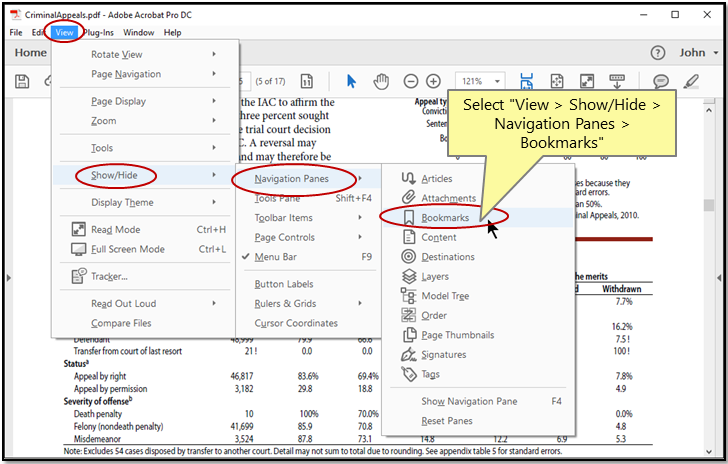
Select Show Navigation Bar then click OK.

Adobe acrobat show pdf image icon. Click on the Correct Suspects icon magnifying glass. Select the image file and click Open. On Windows Explorer use Tools Folder Options then tab File Types.

Click Choose Icon and then click Browse. In my case the first method fixed the missing icon. I am using Adobe Acrobat 8 on a 64bit Windows Vista Home Premium Operating System.

Click Accept for each correction and then Done whenever youre finished. In Acrobat Pro you can rename flatten and merge layers change the properties of layers and add actions to layersYou can also rearrange layers import layers from image files and other PDFs and lock layers to prevent them from being hidden. Select the file type from the File Of Type navigate to the location of the image file and then double-click the file.

Open the PDF in Acrobat and then choose Tools Edit PDF Add Image. This will change all your PDF file icons back to the Adobe PDF icon. An open folder named Program Data.

Is there any way to stop this and to revert back to the generic redgrey PDF Icon using Adobe Acrobat Reader. Ok the file association is correct AcroExchDocument will point to your Adobe Reader. D Click on Apply and OK.

You should be able to change the icon associated with the PDF file type. The PDF files that I store on my Desktop show an image of page 1 of the particular PDF file rather than the standard PDF redgrey generic file icon. On the new dialog that pops up go to the Open with section and select Adobe Acrobat or Adobe Reader and then click on the Change All button.

Have you tried using attachmentsView ShowHide Navigation Panes AttachmentsClick the Add a new attachment iconView Tools Content and select the Link iconSelect the textimage to create the linkIn the Create Link dialog box select Go to a page view and click NextIn the Attachments pane double-click the attached file and click on Set Link. Click where you want to place the image or click-drag to size the image as you place it. Acrobat Pro does not allow you to author layers that change visibility according to the zoom level.

On my other two computers one vista one xp the normal Adobe Acrobat File Icons are changed to show a preview of the first page of the document. I just bought this computer and installed Adobe Acrobat 8 on it. From the menu that comes up select Get Info.

Thankfully I found a couple of ways to get the proper Adobe Acrobat DC or Acrobat Reader DC icon back on the taskbar and Start menu. Double-click the button and then click the Options tab and choose Icon Only from the Layout menu. You may not alter the Adobe PDF file icon in any manner including size proportions colors elements and so forth or animate morph or otherwise distort its perspective or appearance.

Choose Push from the Behavior menu and then choose Rollover from the State list. Open a folder named Start Menu. Next you have to open Programs and search for an icon or wrong image of Adobe Acrobat XI Pro which looks like a shortcut.

Acrobat will identify suspected text errors and display the image and text side by side. C Always show icons never thumbnails should be unchecked and Display file iconson thumbnails should be checked. Here you can use the Change Icon button.

Set the Full Screen navigation bar preference In the Preferences dialog box under Categories select Full Screen. B Click on Folder options. The Adobe PDF file icon must appear by itself with a minimum spacing the height of the icon between each side of the icon and any other graphic or textual elements on your web page.

Follow the below instructions. Go to My Computer. A Open Computer Click on Tools on the toolbar.

Pick one of your PDF files and right-click or Ctrl-click on the file. In the Open dialog box locate the image file you want to place. Open Local Disk C.

Select the PDF extension then click Advanced.

Sunday, August 26, 2018

Android Create Icon Image Asset

In the Icon Type field select Launcher Icons Adaptive Legacy. Design Launcher App icons for various screen.


Asset Store Game Icon Game Gui Games

Select Image to specify the path for an image file.

Android create icon image asset. So I changed Asset type to Action Bar and Tab iconsBut it causes image to appear as white blocks. The basic procedure to create an icon is. This will be placed in the root of the ZIP file Android folder and named playstore-iconpng.

Whitrie Solutions are pioneers in web mobile app development. In method 1 we will do it through the way Android Studio provided to you. To start Image Asset Studio select Android in the Project Window.

Open the Icon Type dropdown and select Launcher icons legacy only Give your icon a name. Now an XML file is created in the drawable directory it is a VectorDrawable. I am facing problem at 2 levels.

We will also create the Google Play Store icon which is a 512 x 512 pixel icon. Show grid file_download Download ZIP. A pop-up screen will arise like below.

In the Foreground Layer tab select an Asset Type and then specify the asset in the field underneath. These show up in the system status bar and notification shade. Lets open your project in Android Studio and create a new Image Asset in app - New - Image Asset In the Foreground Layer tab change the image asset Path to.

Only supporting earlier versions of Android. Image Clip Art or Text. Create vector drawables and vector icon animations.

Access 7000 courses for 15 days FREE. Generate notification icons for your app. Httpspluralsightpxfioc12916574313407490 Android Kotlin tutorial.

You can now create an Adaptive Launcher Icon or Legacy Only Launcher Icon as per your requirement. Generate app launcher shortcut icons Android 71. Luckily you can use them in your application.

Generate nine-patch 9png assets for your app normally used for custom UI widgets. For Android app icons well create the 6 different required icon named iconpng and place them into their respective drawable folders. Android Studio is an Android development tool it contains an important asset that is images and icons.

I am trying to create an image asset in Android studio. You will get the optimized images in all sizes you need including xxhdpi xhdpi hdpi mdpi ldpi drawables Image baker is created by Whitrie Solutions Pvt Ltd. Right click on the res folder and select New Image Asset.

Choose the asset that you want to use. You have now opened Image Asset Studio. Here choose Action Bar and Tab Icons in Icon Type.

And click the Clip Art button to select an icon you want. Open the project in Android Studio Select the app folder Go to File New Image Asset On Foreground Layer select the provided image and resize in order to get the proper aspect for the icon On Background Layer use the background provided Click. First when I launch Asset Studio and select an image with Asset Type set as Launcher Icon asset is created inside mipmap folder instead of drawable folder.

Use Inkscape GPL license to create your basic icon shape then export it Upload your icon to the Asset-Studio website and make adjustments if needed Download zip of finished resources from the website. Arrow_back Android Asset Studio Launcher icon generator. Select Clip Art to specify an image from the material design icon set.

Create Android iOS assets online Image baker is a tool to generate iOS and Android assets. Open Android Studio and go to the app res right-click New Image Asset as shown in the below figure.

Thursday, August 23, 2018

Data-av Icon Image

Please let me know. We are three equal parts.


Pin On Design Display Ideas Creative

Find high-quality stock photos that you wont find anywhere else.

Data-av icon image. When voicedata outlets are placed in the middle of a wall the equipment cord used to connect the workstation to the network is often draped across the floor. The Center for Holistic Healing Art Helping successful people expand their awareness and make deeper connections so that they may lead more powerful and balanced lives. Every pixel of the face being used as a source of information.

Strategically placed voicedata outlets allow for less expensive cords to be placed in less hazardous positions. Because of our diverse backgrounds we offer support for your journey no matter who you are. It can also be used on pseudo-elements in which case the value of the attribute on the pseudo-elements originating element is returned.

Personal and Commercial use. Click here to enlarge image. Wedding planning is an exciting and happy time but it can also be a little daunting with endless decisions to make especially when planning a big wedding at home and in current times an extra level of stress has been added due to not knowing what covid restrictions might be in place.

Download now Av Free Icons - Pack Monochrome Available sources SVG EPS PSD PNG files. Wide Range of Metal Options. Unlike traditional marker-based motion capture systems which capture a very limited number of marker positions Performer makes use of the whole facial image to track facial movements.

Search from Av Equipment stock photos pictures and royalty-free images from iStock. Vintners Mint TM Commemorative Medallions can be struck in these readily available metals. The only limit is your imagination.

Icon Unicode can be used to add the icon as a pseudo element to the menu or other web elements using custom CSSTo find the icon Unicode open the icon library in the advanced layout builder by clicking on the icon element and hover over the icon to view the Unicode or Charcode. Let the Intaglio Mint artisans assist you in crafting a medallion as unique as your wines. QR Code linked to any Winery web page.

Join Innahura Maldives for Earth Hour 2021 at the resort or from your own home - lets switch off the lights and come together for nature at 2030 on 27th March. Download now this free icon pack from Flaticon the largest database of free vector icons. Tuning in to Teens is a parenting program designed to help parents improve relationships and connect with their teens.

The table below shows all Google AV icons. Sculpted image of the Winery. Add image post slider society6 Widget Viewing 10 posts - 1 through 10 of 10 total Author Posts January 27 2018 at 100 am 903601 heysnadsParticipant Hello Im currently customizing the child theme of Enfold and Im looking to change the arrow icon in the post slider data-av_icon to an image.

POST apiCycleExplorer Dominant cycle analysis for individual datasets. Font Awesome 5 Intro Icons Accessibility Icons Alert Icons Animals Icons Arrows Icons Audio Video Icons Automotive Icons Autumn Icons Beverage Icons Brands Icons Buildings Icons Business Icons Camping Icons Charity Icons Chat Icons Chess Icons Childhood Icons Clothing Icons Code Icons Communication Icons Computers Icons Construction Icons. In Flutter you can create an icon from an image by using a widget called ImageIconYou only need to provide an instance of ImageProvider such as AssetImage NetworkImage MemoryImage and ResizeImageThe below example uses AssetImage to load the image.

What is Tuning in to Teens. The attr CSS function is used to retrieve the value of an attribute of the selected element and use it in the stylesheet. The Best ProductsTools and Craftsmanship.

Kristi the artist Amy the lawyer and Andrea the mystic. Calendar - KINETIC GRAPPLING LLC. Click here to enlarge image.

Aria-hiddentrue data-av_icon data-av_iconfontentypo-fontello Search Johnson Home Construction has created a culture of competency. Je firma zaoberajúca sa správou a rozvojom online projektov s mesačným dosahom na viac ako 600 000 ľudí. We recognize ourselves in you.

Can be used to plot Dominant Cycles as indicators on a chart with any charting platform eg.

Wednesday, August 22, 2018

Frida Kahlo Images Of An Icon

There is the popular Frida hailed in Mexico as a national icon. And compulsively exploited this human need to share ones image.


Frida Kahlo Sticker Paper Source In 2021 Hippie Sticker Feminist Sticker Sticker Art

This painting has been interpreted as an allegory for Fridas relationship with her Aztec past.

Frida kahlo images of an icon. Kahlo poses next to her painting The Two Fridas Oct. Frida Kahlo graffiti - portrait in black and white with flowers in hair and ear rings painted on wall in Buenos Aires Argentina. Large collections of hd transparent Frida Kahlo PNG images for free download.

Insurance Fraud Work Icon - Frida Kahlo Museum. Frida Kahlo through the Lens of Nickolas Muray was an exclusive photographic exhibition of twenty-four photographs by Nickolas Muray 1895-1965 that also featured excerpts from letters between Kahlo and Muray. Kahlo around age 6 1913.

Frida Kahlos clothes on display in the Frida Kahlo Museum in Mexico City. There are many Frida Kahlos. A place for fans of Frida Kahlo to view download share and discuss their favorite images icons photos and wallpapers.

Our Lady of Sorrows Fridolatry The Tehuana Matriach Sexual Modernity. Colorful courtyard at the Frida Kahlo Museum in Mexico City. Though she only lived to be 47 years old she left behind a legacy of art that still fascinates and inspires to this day.

Kahlo transformed the word different to normal We know Frida Kahlo the artist. Most importantly she was the patient who tolerated dire physical pain and underwent more than 35 operations throughout her life. These pictures offer a glimpse into this museum and the colorful life of Frida Kahlo.

Find frida kahlo art stock images in HD and millions of other royalty-free stock photos illustrations and vectors in the Shutterstock collection. In the last two decades an explosion of Kahlo-inspired films plays calendars and jewelry has transformed the artist into a veritable cult figure. Frida Kahlo by Lola Álvarez Bravo ca.

Frida Kahlos studio inside the Casa Azul the museum dedicated to the artist in Mexico City Jan. My Nurse and I 1937 is an image of a nurse feeding her baby. Based on detailed analyses of the artists paintings diary letters photographs medical records and interviews the book also assesses Kahlos critical impact.

These rare photos taken by famed French photographer Gisèle Freund during the early 50s document the last days of a magnificent creator and cultural icon and serve as a fitting. Then there is Frida the artist Frida the feminist Frida the muse. Images of an Icon February 3 June 10 2007.

Frida Kahlo Museum Courtesy of the Glenbow Museum Frida at the age of 5 Anonymous 1912. Kahlo Frida Painters -- Mexico -- Biography Publisher Albuquerque. She was the woman who painted brutal self-portraits and she was also a wife who endured miscarriages and a broken marriage.

On public display for the first time in the United States after a brief showing in Europe Her spirit is stranger than the angels. But there is a lesser-known Frida. See more images from Frida Kahlo.

Download Frida Kahlo PNG for non-commercial or commercial use now. She has been hailed as a modern queer icon. The exhibition courtesy of a loan through Murays.

An icon and an inspiration in the world of fashion. Rather it offers another kind of portrait of the artist a means of seeing her through the eyes of those who surrounded her. The infantile image of breastfeeding symbolises how colonial antiquity has allowed Frida to.

Report Abuse - Frida Kahlo Clothes. On this very day in 1907 modern art icon Frida Kahlo was born in a borough of Mexico City. Gannit Ankori examines Kahlos early childhood medical problems volatile marriage political affiliations religious beliefs and most important her unparalleled and innovative art.

Black and white painting of. All png cliparts images on NicePNG are best quality. Find frida kahlo stock images in HD and millions of other royalty-free stock photos illustrations and vectors in the Shutterstock collection.

Internetarchivebooks Digitizing sponsor KahleAustin Foundation Contributor Internet Archive Language English. Images of an Icon offers a means of seeing Frida Kahlos world through the eyes of those who surrounded her. Courtyard with prehispanic sculptures at the Frida Kahlo Museum at Coyoacan in.

Portraits of an Icon is not another book featuring Kahlos beloved tortured self-portraits. Thousands of new high-quality pictures added every day. Modern masters of the camera such as Lucienne Bloch Emmy Lou Packard Florence Arquin and Manuel Alvarez Bravo as well as leading photojournalists such as Giselle Freund Bernard Silberstein and Fritz Henle captured.

University of New Mexico Press Collection inlibrary. Modern masters of the camera such as.